A repository of notes about Performance Testing, Automation, RPA, and Web Design.

  • UiPath

    Show all posts related to UiPath

  • Windows

    Show all posts related to Windows

  • Web Design

    Show all posts related to Web Design

Showing posts with label PHP. Show all posts

How to Setup IIS and PHP on Windows 10 Desktop

Basically I followed this step-by-step from Microsoft, but for my own sake I'm writing my own so it's easier to find.

Setup IIS from Windows Control Panel

  • Open Control Panel >> Programs >> Turn Windows features on or off
  • Select Internet Information Services >> Expand and check CGI under World Wide Web Services -- Application Development Features
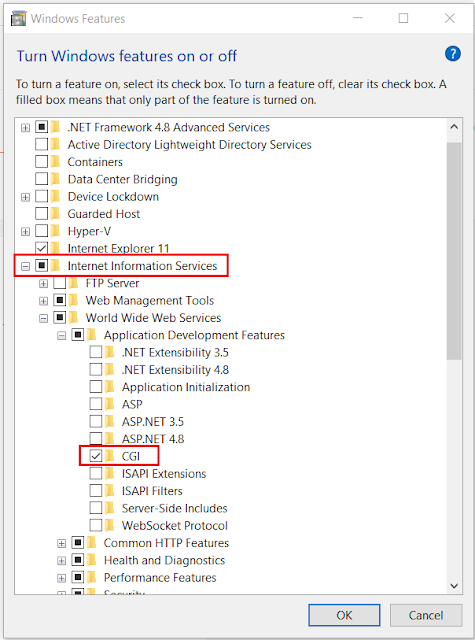

  • Test by opening http://localhost/ on your browser


Download and Install PHP

  • Extract PHP zip files to C:\PHP
  • Extract WinCache zip files to C:\PHP\ext
  • Open Control Panel >> System and Security >> System >> Advanced System Settings
  • On System Properties >> Go to Advanced tab and add a C:\PHP System Variable under Environment Variables

  • Open IIS Manager >> Select your machine under connections >> Open Handler Mappings

  • Add Module Mapping with the following details:
    • Request path: *.php
    • Module: FastCgiModule
    • Executable: C:\PHP\php-cgi.exe (location of php-cgi.exe within your PHP folder)

  • Add Default Document by going to Default Document >> Add >> add default.php and index.php

  • Create a PHP Info page to test
    • Create a phpinfo.php file on Notepad++ (run as Admin) with the following code: 
      <?php phpinfo(); ?>  
      ... and save inside C:\inetpub\wwwroot\


  • Open http://localhost/phpinfo.php on your browser and you should see this page


End. :)


Hope this helps.

Share:

[PHP] Special characters being replaced with black diamonds with question mark �

If you ever come across this issue where special characters like aprostrophe's and ñ's are being replaced by this weird symbol, �, it could be a char-set thing.


I tried a couple of solutions but none of them worked, until I looked into my php.ini for anything related to setting the character encoding, and I found that default_charset is set to UTF-8.

I simply changed it to ISO-8859-1, restarted the IIS server, and refreshed the page.


And it worked!

Php.ini can be found on your PHP installation folder, in my case: 
C:\Program Files (x86)\PHP\php-7.4.8\php.ini

Set default_charset to ISO-8859-1 and enable it by removing the ; in front
default_charset = "iso-8859-1"
Share:

How to override Internet Explorer Compatibility View Settings on HTML

By adding this meta tag inside the <head> part of your script, you allow the page to emulate on Microsoft Edge (which is Windows 10's latest browser), essentially overriding IE compatibility view settings:

<meta http-equiv="X-UA-Compatible" content="IE=edge" />

Note that it should be the first thing inside your head for it to work (lol). So make sure to put it right after the <head> tag. Alternatively, but I haven't tried, if your application runs on IIS Manager you can try adding this code on web.config:

<system.webServer>
    <httpProtocol>
      <customHeaders>
        <add name="X-UA-Compatible" value="IE=edge" />
      </customHeaders>
    </httpProtocol>
</system.webServer>

Helpful link here.

This workaround works on intranet sites hosted on domains where IE compatibility view settings are applied. We have several apps deployed on a whitelisted domain that are being forced to emulate on IE 5, essentially messing up our CSS. So yep, adding a meta tag worked for me! :) Hope this helps!
Share:

How to implement SSO Windows authentication in PHP

I'm currently working on a PHP web application and would like to skip the login page by automatically authenticating a user using his Windows logon credentials. Quite simply I just wanted to get which user is currently logged in the system, and use that variable to query the database and display relevant information on the web page. By getting the authenticated username value, we eliminate the need for a login form because the user has already been authenticated the moment he logs into his computer. Ideally, intranet applications should be using single sign on to avoid redundancy in forms. But LDAP authentication should still be present to handle certain scenarios that still need login screens. So here's how to implement it if you're running a PHP web application served using IIS manager.

What you need to do is enable Windows Authentication on IIS manager and use $_SERVER['AUTH_USER'] on PHP to retrieve the windows logged-in user:

If you don't have Windows Authentication installed on IIS, here's how.
  • Open Server Manager (Start > All Programs > Administrative Tools > Server Manager)
  • Navigate to Roles > Web Server (IIS)
  • Right-click on Web Server (IIS) and select Add Role Services. 
  • Scroll down on the list of services and find Windows Authentication under Security.
  • Select and install.


Once Windows Authentication is installed, go to IIS Manager, navigate to your site and enable it under IIS > Authentication. Also make sure to disable Anonymous Authentication to avoid conflict.


Now to back to your PHP code, as mentioned, $_SERVER['AUTH_USER']returns the domain and username of the currently logged in person, ie: DOMAIN\myusername01

If you want to extract just the username, you can use PHP's str_replace() function, ie:

str_replace("DOMAIN\\","",$_SERVER['AUTH_USER']);

This returns the naked username, which you can then use to query your database for validation.

That's it, hope this helps! :)
Share: