


Basically I followed this step-by-step from Microsoft, but for my own sake I'm writing my own so it's easier to find.
Setup IIS from Windows Control Panel
- Open Control Panel >> Programs >> Turn Windows features on or off
- Select Internet Information Services >> Expand and check CGI under World Wide Web Services -- Application Development Features
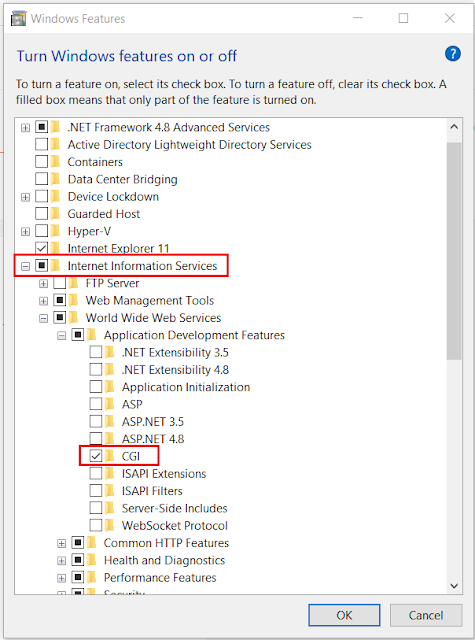
- Test by opening http://localhost/ on your browser

Download and Install PHP
- Create a C:\PHP folder on your local drive
- Download latest PHP non-thread-safe zip package from Windows PHP Download Page

- Download WinCache from SourceForge

- Extract PHP zip files to C:\PHP
- Extract WinCache zip files to C:\PHP\ext
- Open Control Panel >> System and Security >> System >> Advanced System Settings
- On System Properties >> Go to Advanced tab and add a C:\PHP System Variable under Environment Variables

- Open IIS Manager >> Select your machine under connections >> Open Handler Mappings

- Add Module Mapping with the following details:
- Request path: *.php
- Module: FastCgiModule
- Executable: C:\PHP\php-cgi.exe (location of php-cgi.exe within your PHP folder)

- Add Default Document by going to Default Document >> Add >> add default.php and index.php

- Create a PHP Info page to test
- Create a phpinfo.php file on Notepad++ (run as Admin) with the following code:
<?php phpinfo(); ?>
... and save inside C:\inetpub\wwwroot\

- Open http://localhost/phpinfo.php on your browser and you should see this page

End. :)
Hope this helps.

