A repository of notes about Performance Testing, Automation, RPA, and Web Design.

  • UiPath

    Show all posts related to UiPath

  • Windows

    Show all posts related to Windows

  • Web Design

    Show all posts related to Web Design

How to edit hosts file in Windows 10

 Might come in handy!

1. Run Notepad as Administrator (right click > Run as Admin)


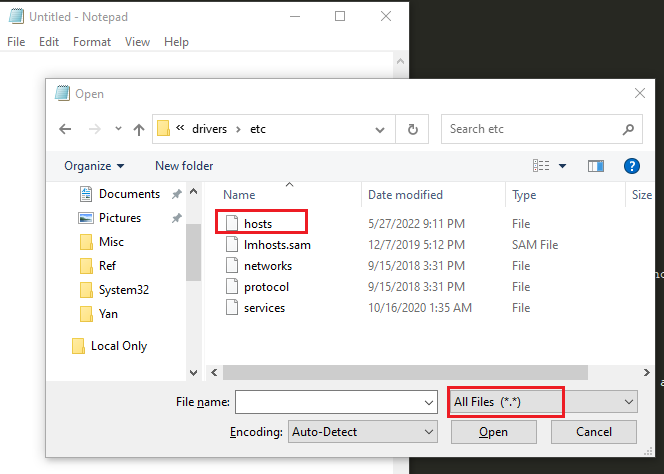
2. Open the location C:\Windows\System32\Drivers\etc, select All Files and hosts should appear on the list


3. Add the IP and hostname on the last line then save. In this case I added two hosts for surfandperf and google. You may read the commented part for more details.


That's it! Test by checking your browser if the hostname works.

Share: